
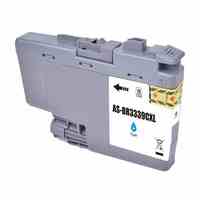
Premier Brother LC3333 Compatible Cyan Ink Cartridge
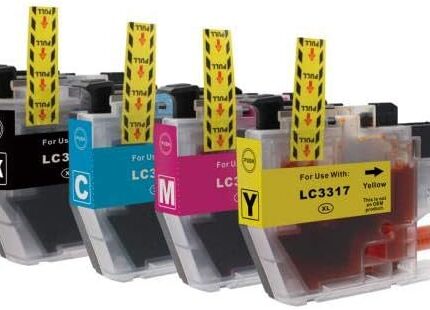
The Brother LC3333 compatible cyan ink cartridge is a Premium Compatible replacement for supported Brother colour inkjet printers using the LC3333 family. The listed colour yield is 1,500 pages. Cyan contributes to blue and green tones and combines with magenta and yellow to create many mixed shades, while black supports strong text and darker detail. This third-party compatible cartridge is intended for practical home, school, office and business printing and is not genuine Brother ink.
For New Zealand customers searching for Brother LC3333 cyan ink, the most important buying step is matching the exact printer model and cartridge family. Colour alone is not enough because Brother uses different consumable families. Use the verified model list below before ordering.
Key Features
- Premium Compatible Brother LC3333 cyan ink
- LC3333 Cyan / LC-3333 Cyan reference
- Single cyan replacement cartridge
- Listed colour yield: 1,500 pages
- Designed for two verified Brother printers
- Suitable for documents, graphics, presentations and photographs
- Third-party compatible replacement
- Clear compatibility guidance for NZ customers
Full Compatible Brother Printer Model List
- Brother DCP-J1100DW
- Brother MFC-J1300DW
Model names may also appear as DCP J1100DW, DCPJ1100DW, MFC J1300DW or MFCJ1300DW. Compare the complete printer designation shown on your machine. If your model is not listed, contact Inkrefill for confirmation before purchasing.
Brother LC3333 Cyan Ink Explained
The LC3333 cyan ink cartridge supplies the cyan channel in the supported Brother colour system. Cyan is important for blue and green shades and contributes to many mixed colours when combined with magenta and yellow. When cyan is depleted, photographs, charts, illustrations and colour documents can lose balance. Replacing the correct cyan cartridge can restore the required colour channel while leaving other usable cartridges in place.
This product is Premium Compatible, meaning it is a third-party replacement rather than genuine Brother-branded ink. Customers comparing replacement options should check the exact printer model, LC3333 family, cyan colour and product type before checkout. Cartridge appearance should not be used as the only compatibility test.
1,500-Page Yield Reference
The listed colour yield is 1,500 pages. This is a catalogue reference for planning and comparison, not a guaranteed page count for every print job. Large cyan graphics and photographs can consume considerably more ink than lightly covered text. Print quality settings, paper, cleaning cycles, alignment routines and printer condition can also affect consumption.
Regular users can monitor actual cartridge replacement dates and keep the LC3333 reference in purchasing records. Businesses can record the printer model alongside the cartridge code, while home and school users can retain the original packaging for easy identification. Keeping a correctly matched spare cyan cartridge can help reduce interruptions.
Printing Applications
Brother LC3333 cyan ink can support reports, presentations, charts, school assignments, photographs, graphics, forms and business documents on compatible Brother printers. Cyan is essential for blue and green areas and for many blended shades. Home offices can use it for household and school printing, while businesses can use cyan for presentations, customer documents, quotations and promotional material.
The final colour result depends on the complete ink set, paper, printer settings, source material and printer condition. A photograph can use more cyan than a text document, so actual cartridge life varies. Maintaining the correct colour cartridge helps the printer reproduce its intended colour channels.
Installation Guidance
Keep the Brother LC3333 cyan ink cartridge sealed until required. Confirm that your printer is a supported DCP-J1100DW or MFC-J1300DW and that LC3333 is required. Follow the printer’s normal replacement procedure, remove protective materials as instructed and install cyan in the matching colour position. Avoid touching electrical contacts, ink outlets and sensitive printhead components.
If recognition fails, confirm the exact model and LC3333 Cyan reference, check protective materials and carefully reseat the cartridge. Never force it. If output quality needs attention, use the printer’s normal nozzle-check, cleaning or alignment functions where available.
Storage and Care
Store unused Brother LC3333 cyan ink in a clean, dry location away from direct sunlight, excessive heat, moisture and freezing conditions. Keep the cartridge sealed until installation and protect its contacts and ink outlet. Retain packaging so the colour and cartridge reference remain easy to identify.
Compatibility and Buying Checklist
- Confirm DCP-J1100DW or MFC-J1300DW.
- Confirm LC3333 or LC-3333 is required.
- Confirm cyan is the required colour.
- Check the exact printer designation.
- Remember this is Premium Compatible third-party ink.
- Use 1,500 pages as the listed colour-yield reference.
- Do not assume other Brother printers use LC3333.
- Contact Inkrefill if your model is not listed.
Managing Cyan Ink for Regular Printing
Recording installation dates and replacement dates can help regular users understand their own cyan consumption. This is useful for offices, schools and home businesses that depend on colour printing. A cartridge yield is a reference, but real usage depends on how much cyan appears on each page. Large graphics and photographs can change consumption substantially.
Appropriate printer settings and paper can also affect output and usage. Following the printer’s normal maintenance instructions and using the recommended media can support consistent results. A spare LC3333 cyan cartridge can be kept available when an important colour print run is approaching.
Why Exact Compatibility Matters
Brother cartridge families are model-specific. A cartridge that is cyan and branded as Brother compatible is not automatically suitable for every Brother printer. Match the complete printer model with LC3333. For this product, the verified models are DCP-J1100DW and MFC-J1300DW.
If you are replacing an existing cartridge, compare the cartridge reference shown by the printer or printed on the old cartridge where available. Avoid relying only on a product image or a general search term. Exact model matching helps reduce purchasing errors.
Helpful Inkrefill NZ Resources
Visit the Inkrefill NZ shop, browse the homepage, explore Brother ink cartridges, read the FAQ, check delivery information, review the shipping policy, read the returns policy, use Contact Us, learn about Inkrefill on About Us, and review online bank payment information.
Frequently Asked Questions
Which printers are verified?
Brother DCP-J1100DW and Brother MFC-J1300DW.
What colour is this cartridge?
Cyan.
Is this genuine Brother ink?
No. It is a Premium Compatible third-party cartridge.
What yield is listed?
The listed colour yield is 1,500 pages, with actual usage varying by print coverage.
Can another Brother printer use it?
Only after LC3333 compatibility is confirmed for that exact model.
Product Summary
The Brother LC3333 compatible cyan ink cartridge is a Premium Compatible replacement with a listed 1,500-page colour yield for the verified Brother DCP-J1100DW and MFC-J1300DW. It supports everyday colour printing and should be ordered only after exact model matching.




Reviews
There are no reviews yet.