
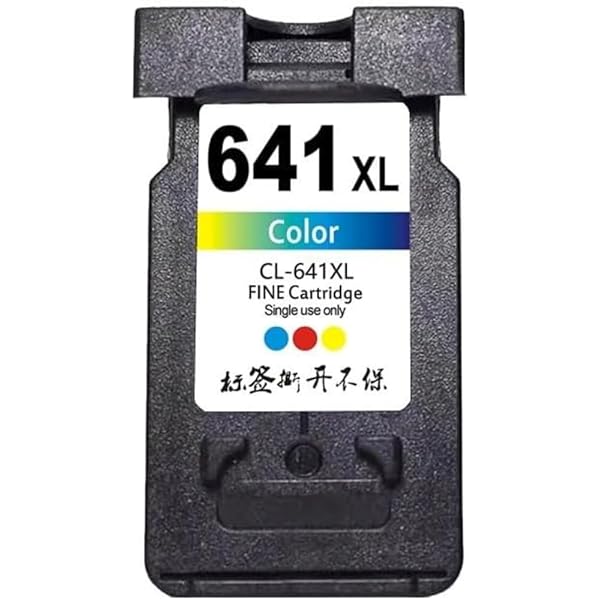
ColourMax Canon CL-641XL Tri-Colour Compatible Ink Cartridge
The Canon CL-641XL compatible ink is a tri-colour compatible cartridge for selected Canon PIXMA printers. It combines cyan, magenta and yellow in one convenient consumable and uses the CL-641XL reference. The XL designation identifies the larger-capacity cartridge family. Confirm your exact printer before ordering.
Key Features and Benefits
- CL-641XL tri-colour compatible cartridge
- Cyan, magenta and yellow
- XL cartridge family
- Third-party compatible replacement
- Selected Canon PIXMA support
- Useful for documents and graphics
- Full compatibility list
- NZ online ordering
Full Compatible Printer Model List
- Canon PIXMA MG2160
- Canon PIXMA MG2260
- Canon PIXMA MG3160
- Canon PIXMA MG3260
- Canon PIXMA MG3560
- Canon PIXMA MG3660
- Canon PIXMA MG4160
- Canon PIXMA MG4260
- Canon PIXMA MX376
- Canon PIXMA MX396
- Canon PIXMA MX436
- Canon PIXMA MX456
- Canon PIXMA MX476
- Canon PIXMA MX516
- Canon PIXMA MX526
- Canon PIXMA MX536
- Canon PIXMA TS5160
Understanding Canon CL-641XL compatible ink
Canon CL-641XL compatible ink should always be selected by exact model and reference. Printer brands contain many different cartridge families, and similar-looking printer names do not automatically share the same consumable. Check the model printed on your machine and compare it with the list above before checkout.
Correct matching supports the printer’s normal installation and recognition process. It also makes future reordering easier because you can record the exact consumable reference alongside the printer model. If you are replacing an existing item, compare its code with the reference on this product page rather than choosing by colour or brand alone.
Everyday Applications
This product is suitable for regular home, school, office or small-business use where the supported equipment is used. Typical requirements include correspondence, reports, invoices, forms, records, quotations, school documents and general administration. For labels, common uses include file folders, archives, storage systems and document identification. For colour ink, graphics, charts and images can be produced when the printer and paper are correctly configured.
Keeping the correct replacement available can help reduce interruptions when an installed consumable reaches its replacement point. Users operating multiple printers should maintain a simple record of each model and its required consumables so that a replacement is ordered for the correct device.
Installation and Setup Guidance
Follow the normal manufacturer replacement procedure for your exact printer. Remove the existing consumable carefully, prepare the replacement according to its packaging and install it into the correct position. Do not force a cartridge, toner or drum into place. For labels, load the roll correctly, confirm the label dimensions in the software and make sure the roll is aligned before printing.
After installation, allow the printer to complete its normal recognition, alignment, calibration or reset process. If a warning remains, check that all protective materials were removed, the consumable is seated correctly and the printer model matches the reference. For a drum product, follow any drum-reset instructions specified by the printer.
Print Quality, Capacity and Product Life
Actual results depend on the type of work being produced. Ink and toner consumption changes with page coverage, graphics, photographs, text density, print settings and printer condition. Label usage depends on how many labels are used for each folder or project. Drum service life is measured differently from toner yield and depends on printer design, print volume and operating conditions.
Where a product listing states a yield or quantity, treat that information as a useful planning reference rather than a guarantee for every individual print job. Large solid colour areas and heavy graphics can consume more ink or toner than ordinary text pages. Good printer maintenance, suitable media and correct settings can help support consistent output.
Storage and Care
Keep unused cartridges, toner, drums and label rolls in their original protective packaging until required. Store them in a dry environment away from excessive heat, moisture and direct sunlight. Handle sensitive contacts, imaging surfaces and cartridge nozzles carefully. Do not open a replacement prematurely if it will not be installed immediately.
Why Exact Compatibility Matters
Canon CL-641XL compatible ink is reference-specific. A cartridge or drum from a related printer family may have a different physical design, electronic identification or consumable specification. Checking the exact model is therefore an important part of the buying process. For labels, both the roll reference and dimensions should be checked. For ink and toner, the colour, capacity and cartridge family should also be confirmed.
If your exact printer is not included in the verified list above, contact Inkrefill before ordering rather than assuming compatibility. This is especially important for newer printer generations, regional model variants and machines with similar product names.
Inkrefill NZ resources: homepage · shop · FAQ · Contact Us · delivery information · shipping policy · returns policy · About Us · online bank payment.
Frequently Asked Questions
How do I confirm compatibility?
Match the exact printer model with the reference and complete model list shown on this page. If the model is not listed, contact Inkrefill before ordering.
Is this a genuine manufacturer product?
For compatible listings, this is a third-party compatible replacement. Genuine manufacturer status should only be assumed where the product listing specifically identifies it as genuine.
Can I use it in any printer from the same brand?
No. Printer brands use many different consumable families. Always match the exact printer and reference.
What should I do if the printer does not recognise it?
Check installation, protective materials, seating and the exact reference. If the issue remains, contact Inkrefill with the printer model and product reference.
Product Summary
Canon CL-641XL compatible ink provides a practical replacement or supply option for the verified equipment listed above. Confirm your exact printer, reference and required consumable type before purchase for the most reliable match.









Reviews
There are no reviews yet.