
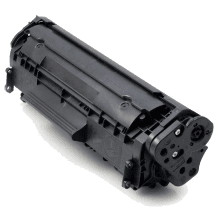
CrispCore Canon FX10 Compatible Toner: Reliable Compatible Printing
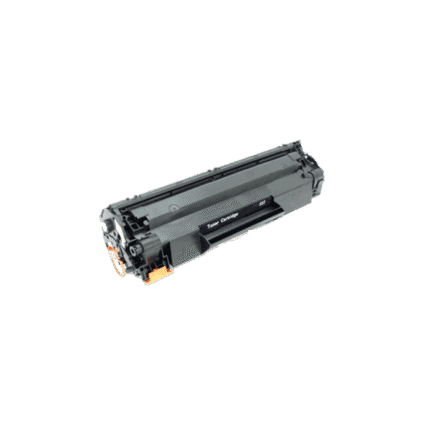
Choose a clearly matched Canon FX10 compatible toner replacement when your supported laser printer needs dependable black toner. This compatible cartridge is built around the reference FX10 / CART304 / CART104 and the printer models listed below. Checking the exact model before ordering is essential because toner families can look similar while using different cartridge designs. This page brings the key product information together so you can compare the cartridge reference, printer compatibility, features and expected performance in one place.
Product Overview
This is a compatible third-party toner cartridge intended for supported printers rather than an original manufacturer cartridge. It is designed as a practical replacement for routine monochrome printing in homes, offices, schools and small businesses. The cartridge reference makes it easier to identify the correct consumable, while the full compatibility list helps reduce ordering errors. Always compare your printer’s complete model designation with the list on this page before checkout.
Black laser toner is commonly used for invoices, reports, letters, forms, quotations, statements, school documents, labels and other everyday paperwork. A correctly matched cartridge can help maintain a predictable replacement routine and reduce the risk of ordering a toner family that is physically similar but intended for another printer. Actual print results depend on the printer, page coverage, print settings, paper, maintenance and operating conditions.
Key Features
- Cartridge reference: FX10 / CART304 / CART104
- Product type: Compatible black laser toner cartridge
- Designed for the supported printer models listed below.
- Black toner for everyday monochrome documents and business printing.
- Cost-conscious compatible alternative to genuine manufacturer toner.
- Clear cartridge identification for easier repeat purchasing.
- Suitable for home, office, school and small-business printing needs.
- Backed by Inkrefill’s online product and customer information resources.
Full Compatible Printer Model List
The compatible printer models supplied in the product catalogue are:
- FAXPHONE L90
- FAXPHONE L120
- FAXPHONE L140
- FAXPHONE L160
- Canon LBP-2900
- Canon LBP-3000
- Canon imageCLASS D420
- Canon imageCLASS D450
- Canon imageCLASS D480
- Canon imageCLASS MF4010
- Canon imageCLASS MF4012
- Canon imageCLASS MF4050
- Canon imageCLASS MF4100
- Canon imageCLASS MF4110
- Canon imageCLASS MF4120
- Canon imageCLASS MF4122
- Canon imageCLASS MF4130
- Canon imageCLASS MF4140
- Canon imageCLASS MF4150
- Canon imageCLASS MF4270
- Canon imageCLASS MF4320d
- Canon imageCLASS MF4330d
- Canon imageCLASS MF4322d
- Canon imageCLASS MF4340d
- Canon imageCLASS MF4350d
- Canon imageCLASS MF4370dn
- Canon imageCLASS MF4380dn
- Canon imageCLASS MF4660PL
- Canon imageCLASS MF4680PL
- Canon imageCLASS MF4690
- Canon imageCLASS MF4690PL
- Canon imageCLASS MF6570PL
- HP LaserJet 1010
- HP LaserJet 1012
- HP LaserJet 1015
- HP LaserJet 1018
- HP LaserJet 1020
- HP LaserJet 1022
- HP LaserJet 1022N
- HP LaserJet 1022NW
- HP LaserJet 3015
- HP LaserJet 3020
- HP LaserJet 3030
- HP LaserJet 3050
- HP LaserJet 3050Z
- HP LaserJet 3052
- HP LaserJet 3055
- HP LaserJet M1319F MFP
- HP LaserJet M1005F MFP
Do not assume that a printer in the same family is compatible unless its exact model appears above. Model suffixes, regional versions and printer generations can matter. If your printer is not listed, contact Inkrefill before ordering so compatibility can be checked rather than guessed.
Why the Cartridge Reference Matters
The reference FX10 / CART304 / CART104 is an important part of selecting the correct toner. Laser printers can use cartridges with very similar names but different physical dimensions, chip or recognition systems, page capacities and printer firmware requirements. Searching only for black toner is therefore not enough. Match the exact printer model and cartridge reference together.
For businesses that purchase toner regularly, recording the printer model beside the cartridge reference can make future orders faster and more accurate. Home and school users can use the same approach by keeping the old cartridge packaging or noting the reference before disposing of the empty cartridge. This simple record can save time when the next replacement is required.
Print Performance and Yield
Actual output varies with page coverage, document design, print quality settings, paper, printer condition and maintenance cycles. Text-heavy documents normally consume less toner than pages containing dense graphics or large solid areas. Treat any catalogue yield as a guide rather than a guarantee of an identical page count for every customer.
For high-volume environments, monitor real usage so replacement toner can be ordered before an important print run is interrupted. For occasional users, storing a sealed replacement correctly can make the next cartridge change more convenient.
Installation and Storage Guidance
Keep the cartridge sealed in its protective packaging until installation. Store it in a clean, dry place away from excessive heat, moisture and direct sunlight. Follow the printer manufacturer’s normal installation instructions and remove only the protective materials intended for removal. Make sure the cartridge is seated correctly and allow the printer to complete any normal recognition or calibration process.
If the printer displays a toner warning after installation, first check the cartridge reference, printer model and cartridge seating. Do not force a cartridge into the printer. For laser toner products, avoid unnecessary contact with sensitive cartridge or imaging components. If your printer requires maintenance or calibration, use the manufacturer’s standard controls.
Compatible Third-Party Replacement
This product is a compatible third-party replacement and is not represented as an original manufacturer cartridge. Manufacturer names and model numbers are used to identify compatibility. Brand references should not be interpreted as manufacturer endorsement. The safest purchasing process is to compare your exact printer model with the compatibility list and confirm the cartridge reference before checkout.
Who Can Benefit From Compatible Toner?
Home users can use compatible black toner for correspondence, forms, homework, personal records and general documents. Offices can use it for invoices, reports, quotations, administrative records and customer paperwork. Schools, clubs and community organisations can also benefit from maintaining accurate toner references for repeat purchases. Customers who print frequently may find it useful to keep a spare compatible cartridge in storage so an empty cartridge does not cause unnecessary downtime.
How to Choose the Correct Toner
- Locate the complete printer model on the printer itself.
- Check the old cartridge, packaging or printer documentation for the toner reference.
- Compare the exact printer model with the full compatibility list above.
- Confirm that the product is the required black toner cartridge.
- Review the product details before checkout.
- Contact Inkrefill if any compatibility detail is uncertain.
Helpful Inkrefill Resources
Use these internal resources when researching your order: Shop All | HP Ink & Toner | FAQ | Delivery Information | Shipping Policy | Returns Policy | Contact Us | About Inkrefill | Brother Ink & Toner. The shop provides access to the wider printer consumables range, while the product category and information pages can help you find related supplies and understand delivery, shipping, returns and customer support.
Ordering and Repeat Purchase Tips
For a smooth repeat order, keep the printer model and toner reference together in your records. When the printer reports low toner, check the saved reference before purchasing. If you have several printers, record each machine separately rather than assuming one toner family fits all of them. This approach is particularly helpful for offices where different printer generations may be installed in the same workspace.
Important Compatibility Reminder
Compatibility should always be verified against the exact printer model and cartridge reference before purchase. Firmware, regional variants and model suffixes can affect third-party cartridge recognition. The model list on this page is intended to make the checking process easier. If your exact printer is absent from the list, ask Inkrefill for assistance rather than selecting a cartridge based only on a similar product name.
Why Shop Through Inkrefill?
Inkrefill provides an online range of compatible printer ink and toner products for customers looking for practical replacement options. You can browse related consumables, review delivery and returns information, use the FAQ for common questions and contact the team when you need help confirming a product. Taking a few moments to match the printer model and toner reference can make the ordering process much more reliable.
Summary: this FX10 / CART304 / CART104 compatible black toner is intended for the printer models listed above. Check your exact model, review the product details and keep the cartridge reference available for future purchases. With accurate compatibility checking and correct installation, you can make your regular monochrome printing supply routine easier to manage.








Reviews
There are no reviews yet.