
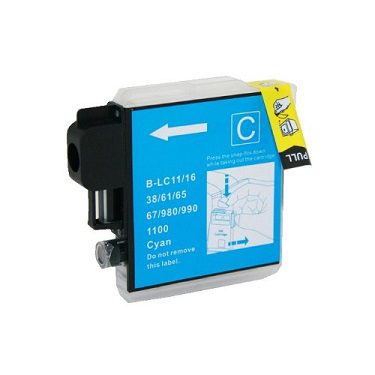
CyanPro Brother LC39 LC38 LC67 Cyan Compatible Ink
This Brother LC39 LC38 LC67 cyan compatible ink is a premium compatible Brother ink cartridge designed for the supported printer models listed on this page. The catalogue specification is LC39 / LC38 / LC67 Cyan; approximately 410 pages at 5% coverage. Before ordering, compare your exact printer model and existing cartridge reference with the information below. This detailed product guide covers features, compatibility, printing use, installation, storage, buying checks and common questions.
Product Overview
Compatible ink provides an alternative to an original manufacturer cartridge for designated Brother printer families. This listing is for a compatible replacement, not a genuine Brother-branded cartridge. The cartridge family, colour and printer model all matter when selecting a replacement. A similar-looking cartridge should not be assumed to be interchangeable.
The stated yield is an approximate catalogue reference where provided. Actual page output varies with print coverage, document type, graphics, photographs and individual printing habits. Text-heavy documents normally consume ink differently from large colour images. For repeat purchasing, keep a record of the printer model and cartridge code so the correct consumable can be reordered quickly.
Key Features
- Premium compatible Brother ink cartridge design.
- Clearly identified Brother LC39 LC38 LC67 cyan compatible ink product family.
- Designed for the compatible models listed below.
- Suitable for everyday home, office and business printing.
- Useful for documents, graphics and routine colour workflows.
- Easy product-code comparison before ordering.
- Practical option for recurring ink requirements.
- Supplied according to the listed catalogue specification.
Full Compatible Model List
Check your printer against this complete compatible model list:
- Brother DCP-J125
- Brother DCP-J315W
- Brother DCP-J515W
- Brother MFC-J220
- Brother MFC-J265W
- Brother MFC-J410
- Brother MFC-J415W
- Brother DCP-185C
- Brother DCP-395CN
- Brother DCP-385C
- Brother DCP-585CW
- Brother DCP-6690CW
- Brother DCP-J615W
- Brother DCP-J715W
- Brother MFC-490CW
- Brother MFC-790CW
Why Compatibility Matters
Brother consumables are available across many cartridge families, and printer models can use different physical formats and recognition systems. Selecting by colour alone is not sufficient. Match the exact cartridge family and your printer model before ordering. This is especially important where several Brother printers are used in one home or workplace.
Correct compatibility also reduces interruptions. Keeping the correct replacement ready when a printer reports low ink can make routine printing easier. Retain the cartridge packaging until installation is complete so the product code remains available if you need support.
Printing Performance
This Brother LC39 LC38 LC67 cyan compatible ink can support everyday printing such as correspondence, reports, forms, school work, graphics and general colour documents, subject to the capabilities of the compatible printer. For consistent results, use suitable paper and follow your printer’s normal cleaning and maintenance procedures. Colour coverage affects consumption, so heavy graphics and photographs can use more ink than standard text documents.
For businesses, correct cartridge selection can simplify stock control and recurring purchasing. For home users, checking the model before checkout helps prevent an incorrect order. The complete compatibility list above is intended to make that check straightforward.
Installation and Replacement Tips
Prepare the printer using its normal cartridge-replacement procedure. Keep the new cartridge sealed until needed. Remove protective packaging as directed, insert the cartridge into the correct colour position without forcing it, close the printer cover and allow the machine to complete its normal recognition process. If an alignment or cleaning cycle is requested, follow the printer’s standard instructions.
Print a small test page after installation and check colour, clarity, alignment and coverage. If output is unexpected, reseat the cartridge and repeat the printer’s normal maintenance procedure. Avoid unnecessary contact with sensitive cartridge components.
Storage and Handling
Store unused compatible ink in its original packaging in a clean, dry place away from excessive heat, moisture and direct sunlight. Avoid crushing or puncturing the packaging. Do not open a sealed cartridge long before it is required. Suitable storage helps protect the consumable until installation.
Smart Buying Checklist
Before ordering, check five points: your exact Brother printer model, cartridge family, colour, product code and stated yield. Compare the code printed on your existing cartridge with this listing. If your printer is not included in the model list, contact Inkrefill before ordering rather than assuming compatibility from a similar model number.
Helpful Inkrefill Resources
Inkrefill | Inkrefill | Inkrefill | Inkrefill | Inkrefill | Inkrefill | Inkrefill | Inkrefill | Inkrefill
Frequently Asked Questions
Is this genuine Brother ink?
No. This is a compatible replacement and Brother references are used for compatibility identification.
How do I confirm compatibility?
Match both your printer model and cartridge family against the full list above.
Does yield vary?
Yes. Actual yield depends on coverage, document type and printing habits.
Can I store a spare?
Yes. Keep it unopened in suitable dry storage and retain its packaging.
What if my printer is not listed?
Contact Inkrefill before ordering so compatibility can be checked.
Final Summary
This Brother LC39 LC38 LC67 cyan compatible ink provides a clearly specified compatible option with detailed features, full model compatibility, installation guidance and practical buying information. Match the cartridge reference carefully, store the product appropriately and use Inkrefill’s support resources whenever you need help.







Reviews
There are no reviews yet.