
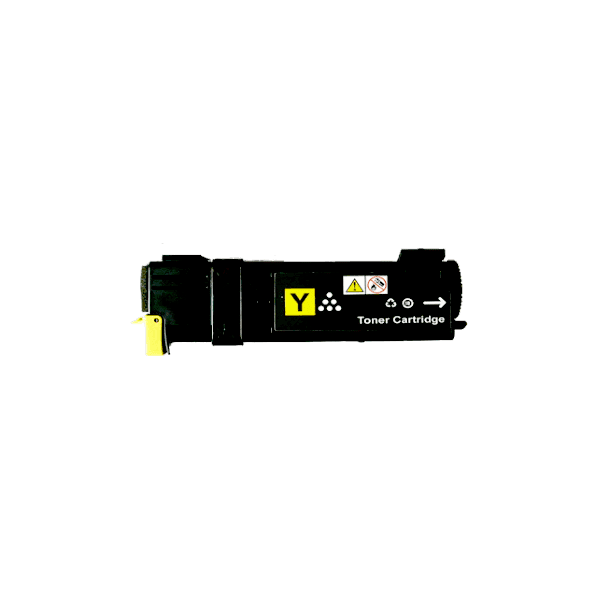
Bright Fuji Xerox CT201635 Compatible Yellow Toner | CM305df & CP305d | Inkrefill NZ – High-Value Compatible Printing
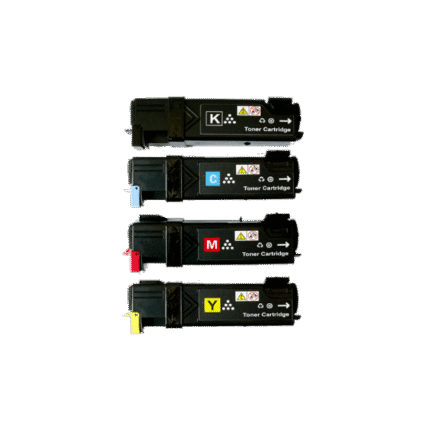
Keep your compatible Fuji Xerox printing workflow organised with this CT201635 compatible yellow toner. This product is a third-party compatible printer consumable rather than a Fuji Xerox-manufactured original. It is intended for the compatible printer information shown on this page. The catalogue lists a yield of 3,000 pages. Before ordering, match the exact printer model and cartridge reference so the consumable you select corresponds with your machine.
Key Features
- Cartridge reference: CT201635
- Colour: Yellow
- Product type: Compatible toner cartridge
- Third-party compatible alternative to an original manufacturer cartridge
- Compatible printer information listed below
- Designed for routine home, business or colour-laser printing where applicable
Full Compatible Printer Model List
Use the following compatibility information as the primary model-checking reference for this product:
- Fuji Xerox DocuPrint CM305df
- Fuji Xerox DocuPrint CP305d
- Fuji Xerox CM305df
- Xerox CM305df
- Xerox CM 305df
- Fuji CM305df
- Fuji Xerox CP305d
- Xerox CP305d
- Xerox CP 305d
- Fuji CP305d
- Fuji CP 305d
For listings where the catalogue does not provide individual printer models, the absence of a model list is intentional rather than an invitation to guess. In that situation, check the exact cartridge code printed on your existing consumable and confirm the intended printer family before ordering. Never substitute a similar-looking cartridge reference simply because it has a comparable number.
Why CT201635 Compatible Toner?
Compatible toner provides another option for replacing a printer consumable when you want a clearly identified cartridge reference for a supported machine. Black toner is commonly used for text-heavy work such as reports, invoices, forms, letters, statements, quotations and administrative documents. Colour toner such as yellow supports colour reproduction when used with the other required toner colours in a compatible colour laser printer.
A correct cartridge match is more important than choosing a product based on appearance. Printer families can use similar-looking cartridges with different references, so checking the model and cartridge code together helps reduce ordering errors. If your workplace has several printers, keeping the cartridge reference recorded beside each printer model can make repeat purchasing easier.
Printing Performance and Yield
The catalogue lists a yield of 3,000 pages. Actual page output can vary where a yield is published because page coverage, document composition, print settings, media, printer condition and other operating factors influence consumption. Text-only pages generally use toner differently from pages containing large graphics, photographs, colour blocks or heavy coverage. For that reason, a published yield should be used as a planning reference rather than a guarantee of an identical page count in every environment.
For colour printing, toner colours work together to create the final image. Cyan, magenta, yellow and black each have a role in colour reproduction, so replacing the correct depleted colour can help maintain the printer’s intended workflow. For monochrome printing, black toner is the primary consumable and is often used for regular office documentation.
Best Uses for Everyday Printing
This compatible toner can be considered for routine printing on the supported machines identified above. Typical applications include business correspondence, invoices, reports, school documents, forms, quotations, internal records, labels and general office paperwork. Colour cartridges can also support presentations, graphics and other documents where colour is required, provided the printer is designed for the listed cartridge.
For regular workloads, monitor your approximate monthly page volume and replacement frequency. This makes it easier to decide when a spare cartridge should be kept available. Businesses with recurring printing requirements may benefit from recording cartridge references in their procurement system so staff can identify the correct consumable quickly.
Installation and Handling Guidance
- Confirm the exact printer model and cartridge reference before opening the package.
- Prepare a clean, stable surface for cartridge replacement.
- Follow the printer manufacturer’s normal removal and installation procedure.
- Handle the cartridge carefully and avoid unnecessary contact with sensitive components.
- Allow the printer to complete its normal recognition, calibration or setup process.
- Print a test page after installation and check the output.
- Keep unused cartridges sealed until required.
- Store consumables in a dry location away from excessive heat, moisture and direct sunlight.
If the printer shows a warning after installation, read the exact message and re-check the cartridge reference. The Inkrefill printer and toner FAQ can help with common questions, and you can contact Inkrefill NZ when you need direct assistance.
How to Check Compatibility Before Ordering
Start by locating the model number on the printer itself or in its settings. Compare that model with the compatible model list on this page. Next, check the cartridge number on the existing toner or printer documentation. For this listing, the reference to check is CT201635. Matching both pieces of information provides a more reliable selection process than choosing by colour, shape or a similar product name.
When the catalogue does not specify individual compatible models, do not assume that every Fuji Xerox or Xerox printer can use the cartridge. Instead, verify the exact cartridge reference and intended printer family before purchasing. This is particularly important for older printer ranges and cartridges with closely related numbering.
Explore More Inkrefill NZ Printer Supplies
Browse the Inkrefill NZ shop for printer consumables, or explore the dedicated Fuji Xerox toner range. Customers using other brands can browse Samsung toner, Brother toner, HP toner and Canon toner. These internal resources make it easier to compare cartridge families without leaving Inkrefill NZ.
Ordering, Delivery and Support
Before placing an order, review the delivery information and shipping policy so you understand the relevant ordering information. If you need to understand return arrangements, see the returns policy. Payment information is available through online bank payment, while business and account information can be reviewed in the billing terms. For general company information, visit About Inkrefill NZ.
Frequently Asked Questions
Is this a genuine Fuji Xerox cartridge?
No. This listing is for a compatible third-party toner cartridge. It is identified by the cartridge reference and compatibility information displayed on this product page.
What colour is this cartridge?
The listed colour is Yellow. For a colour printer, the correct colour cartridge should be matched with the exact printer and cartridge reference.
What is the page yield?
The catalogue lists a yield of 3,000 pages. Where a yield is published, real-world output can vary with page coverage, printer settings, media and printer condition.
Which printers are compatible?
Use the full compatibility list above. Where the catalogue does not specify individual models, verify the cartridge reference and intended printer family before purchase rather than relying on assumptions.
What if I am unsure which toner I need?
Check the model and cartridge number on your existing consumable, review the FAQ, or contact Inkrefill NZ for assistance.
Smart Toner Management
Good consumable management starts with accurate cartridge identification. Record the printer model, cartridge reference and colour in your office purchasing notes. When a cartridge needs replacement, compare those details with the product page before ordering. This simple process can reduce accidental purchases, especially where several similar Fuji Xerox or Xerox models are used.
For colour printers, it can also be useful to monitor each toner colour independently. A depleted cyan, magenta or yellow cartridge may affect colour output even when the other cartridges still contain toner. Keeping compatible replacements organised by cartridge code can help maintain a predictable printing workflow.
Inkrefill NZ Resources for Better Buying Decisions
Inkrefill NZ provides an online destination for printer ink, toner and related supplies. Use the shop to browse products, the FAQ for common questions and the contact page when you need support. You can also review the delivery information, shipping policy and returns policy before completing an order.
For account and transaction information, see the online bank payment and billing terms. You can also review the privacy policy when you want information about site privacy practices.
Final Buying Checklist
- Confirm the exact printer model.
- Confirm cartridge reference CT201635.
- Confirm the required colour: Yellow.
- Review the complete compatible model information supplied on this page.
- Check the published yield where one is provided.
- Review delivery, shipping and returns information before ordering.
- Contact Inkrefill NZ if the cartridge or printer match remains uncertain.
This CT201635 compatible toner listing is structured to make cartridge selection clearer for shoppers and search systems. By checking the exact printer model, cartridge reference and colour before purchase, and by using the Inkrefill NZ internal resources above, you can make a more informed consumable selection and keep everyday printing organised.





Reviews
There are no reviews yet.